Well this chronicles my first attempt at compiling a toolchain for programming ARM’s in ELF code.
Why do I need a toolchain for programming ARMs?
- I found a LPC2378-STK development board in my room
- I want to give ARM programming a try (PS WinAVR is great for programming AVRs)
- I found I have some spare ARM7 LPC2378’s lying around (WTF?) and thought I’ll actually complete my Chumby Speedometer on my car project!
The compile process should be pretty straight forward, but I made a few stuffup’s along the way.
- I had originally wanted to keep it neat and install to a new directory, then the PATH annoyance thing hit me. Setting the path under my user shell didn’t carry over when using sudo which is required to make install. Solved using sudo -s, but then in the end i just redid it all and installed to /usr/local/.
- Realised (should have known) that you need ‘GMP’ and ‘MPFR’ to compile GCC. Available as packages libgmp3-dev and libmpfr-dev in Ubuntu.
- Did my usual of forgetting to set up the prefix install location when configuring…minor boo boo
Setting it all up
Install any packages you need… build-essential is probably essential… GMP and MPFR could be got by using
sudo apt-get install libgmp3-dev libmpfr-dev
Set-up some directories…I opted to use create an ‘arm-elf’ directory in my home to hold both the source and build directories…
cd ~
mkdir arm-elf arm-elf/src
cd ~/arm-elf/src
Get the latest sources…
Get the latest sources for binutils, gcc, newlib, insight (click the links if you need). The versions I used should be obvious from the filenames below. Just be wary that the insight front page is not kept up to date but you’ll find the latest if you follow any of the release links anyway.
wget http://ftp.gnu.org/gnu/binutils/binutils-2.19.tar.bz2
wget http://gcc.releasenotes.org/releases/gcc-4.3.2/gcc-4.3.2.tar.bz2
wget ftp://sources.redhat.com/pub/newlib/newlib-1.16.0.tar.gz
wget ftp://sourceware.org/pub/insight/releases/insight-6.8.tar.bz2
Unpack the sources…
tar -xvjf binutils-2.19.tar.bz2
tar -xvjf gcc-4.3.2.tar.bz2
tar -xvzf newlib-1.16.0.tar.gz
tar -xvjf insight-6.8.tar.bz2
Tweak the gcc source config…
Make a minor config tweak to the gcc source. Edit gcc-4.3.2/gcc/config/arm/t-arm-elf and append mno-thumb-interwork/mthumb-interwork after MULTILIB_OPTIONS and normal interwork after MULTILIB_DIRNAMES. I used nano, see the screenshot below if I haven’t been too clear 🙂
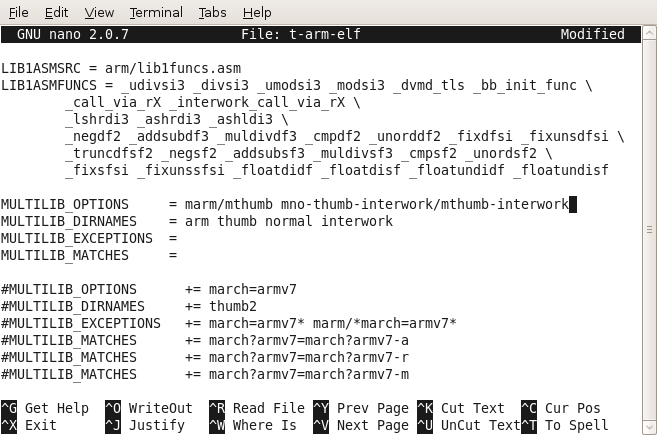
nano ~/arm-elf/src/gcc-4.3.2/gcc/config/arm/t-arm-elf
Start building with fingers crossed…
Now we can start building the toolchain. Note my prefix is /usr/local. First off binutils!
cd ~/arm-elf/
mkdir build build/binutils-2.19 build/insight-6.8 build/gcc-4.3.2 build/newlib-1.16.0cd ~/arm-elf/build/binutils-2.19
~/arm-elf/src/binutils-2.19/configure –target=arm-elf –prefix=/usr/local –enable-interwork –enable-multilib –with-float=soft –disable-werror
sudo make all install
Next just the gcc part of gcc…note we configure the newlib src headers here…
cd ~/arm-elf/build/gcc-4.3.2
~/arm-elf/src/gcc-4.3.2/configure –target=arm-elf –prefix=/usr/local –enable-interwork –enable-multilib –with-float=soft –disable-werror –enable-languages=”c,c++” –with-newlib –with-headers=~/arm-elf/src/newlib-1.16.0/newlib/libc/include
sudo make all-gcc install-gcc
Now newlib…
cd ~/arm-elf/build/newlib-1.16.0
~/arm-elf/src/newlib-1.16.0/configure –target=arm-elf –prefix=/usr/local –enable-interwork –enable-multilib –with-float=soft –disable-werror
sudo make all install
Coming back for the rest off gcc (needed newlib)
cd ~/arm-elf/build/gcc-4.3.2
sudo make all install
…and finally insight gdb
cd ~/arm-elf/build/insight-6.8
~/arm-elf/src/insight-6.8/configure –target=arm-elf –prefix=/usr/local –enable-interwork –enable-multilib –with-float=soft –disable-werror
sudo make all install
Voila done! I should now have all my arm-elf tools! Just a check…
madox@madox-laptop:/usr/local/bin$ ls arm*
arm-elf-addr2line  arm-elf-gcc        arm-elf-insight  arm-elf-run
arm-elf-ar         arm-elf-gcc-4.3.2  arm-elf-ld       arm-elf-size
arm-elf-as         arm-elf-gccbug     arm-elf-nm       arm-elf-strings
arm-elf-c++        arm-elf-gcov       arm-elf-objcopy  arm-elf-strip
arm-elf-c++filt    arm-elf-gdb        arm-elf-objdump
arm-elf-cpp        arm-elf-gdbtui     arm-elf-ranlib
arm-elf-g++        arm-elf-gprof      arm-elf-readelf
Yup all there and runs 🙂 Now the search for the LPC header files… argh
PS : If you copy and paste my commands, be wary of line breaks… I didn’t put \’s anywhere…
Hi,
I have been using GCC-4.2.2 for a while with the lpc2148. I had been setting up GCC a little differently.
I tried your method and it worked for GCC-4.2.2 and GCC-4.2.3. When your method for GCC-4.3.1 and
GCC-4.3.2 my project code developed a problem. I will describe a simplified version.
volatile unsigned int tick = 0;
volatile unsigned in pwm_tick;
int main()
{
while (1) {
if (tick != pwm_tick) {
tick = pwm_tick;
process();
}
}
The pwm_tick is a counter that is incremented every 10 msec in a interrupt routine.
The “if” statement body was never being executed. I found after examining the generated
code that the register load for “tick” or “pwm_tick” was not being branched to. Only one of
the variables was getting loaded before the compare. I fixed it easily. The generated code
for GCC-4.3.2 looks to have some further optimization steps.
I was wondering if you think GCC-4.3.2 would be good for a part like a lpc2900 series which
has a ARM9?
Thanks for posting your method,
Ron Sudjian
It is so difficult to install that into ubuntu.
I only do yum install arm-* on fedora 10
I just wanted to let you know that you list the wrong package above for GMP. That is a development library for a music project….you wanted to list:
libgmp3-dev
Good find Scott 🙂 I wrote the post after the event and just used ‘gmp’ tab on the command line to try remember all the packages. It is indeed libgmp3-dev and I’ve updated the post for anyone reading it in the future.
Refer : http://packages.debian.org/unstable/libdevel/libgmp3-dev
Anyone getting build problems with insight might have to apt-get install textinfo
Makeinfo was missing on server 9.04
Thanks for guide
About the textinfo….
Try texinfo ( apt-get install texinfo )
XD
Great stuff, worked like a charm and I was later to build my LPC2103-stuff in Ubunto (I’ve only before built it in Windows using the Embedded Artist’s ref. environment).
Thank you! It was very helpful!
One comment – I had to install libmpc-dev as well. It’s probably needed only for the newer versions of the gcc.
I get the error:
checking for C compiler default output file name…
configure: error: in `/home/aisha/arm-elf/build/binutils-2.22′:
configure: error: C compiler cannot create executables
See `config.log’ for more details.
after the command:
~/arm-elf/src/binutils-2.22/configure –target=arm-elf –prefix=/usr/local –enable-interwork –enable-multilib –with-float=soft –disable-werror
What should I do?
Hi There
this rather old text (with additional feedback eg texinfo and libmpc-dev – needed) helped me a lot with building working toolchain for my old dusty LPC2106 on my Ubuntu 12.04 – really great – thank you all.
Note arm-elf is dropped since gcc 4.8 so do not hit for the latest versions of tarballs – I sticked to the versions as originally mentioned.
In a case of lpc21isp bare in mind -control and checking your access rights to /dev/ttyUSB0 can save pretty much of your time watching dots in synchronizing phase 🙂
Some nice starting projects can be found under http://siwawi.bauing.uni-kl.de/avr_projects/arm_projects/#lpcio
jfm
mighty make can do a lot of nice things 🙂
Hi,
I am trying to build binutils like below,
~/arm-elf/src/binutils-2.19/configure –target=arm-elf –prefix=/usr/local –enable-interwork –enable-multilib –with-float=soft –disable-werror
But it’s giving error like,
configure: error: C compiler cannot create executables
See `config.log’ for more details.
…….
.
.Can anyone guide me ????