Introduction
The TP-Link TL-WR703N is a low cost, commercially available wireless router that supports OpenWRT and thus is extremely ‘hackable’.
It is marketed as a travel router so it is extremely compact, and for ~$20 shipped to most places it represents great value for hacking and learning.
A bunch of us at the Sydney hackerspace have purchased “non insignificant” quantities of these routers for all sorts of fun. I have committed to providing limited support in providing pre-built OpenWRT images suitable for hacking and writing up some instructions and short HOWTOs.
Specifications
(From OpenWRT Wiki)
- Atheros AR7240 CPU (400Mhz)
- Atheros AR9331 Chipset (integrated wireless)
- 802.11 b/g/n 150Mbps (130Mbps real)
- wireless power output 20dBm – 100mW
- 4 MB flash memory
- 32 MB RAM
- USB 2.0 port
- Powered via micro-USB socket
- Tiny form factor: 5.7cm x 5.7cm
Firmware Images
Three (3) standard pre-built images are available
-
Standard (Download 2013-02-23)
- This is the standard ‘hacker’ image with a suite of goodies built in
- Luci – for easy configuration and setting
- USB Video support
- mjpg-streamer for webcam streaming
- USB Serial support
- belkin, ch431, cp210x, ftdi, option, pl2303, ti-usb
- ser2net for easy serial to Ethernet conversion
- stty for configuring serial
- Lua for simple scripting
- lualibusb
- luasocket
- USB ACM Support for 3G modems and other devices (New in 2012-10-04+ : usb_modeswitch)
- USB Storage and network filesystems
- ext4, nfs, ntfs, vfat
- block-mount for mounting extroot pivot overlays (i.e. adding USB storage for installing programs)
- Old Downloads that may not work with newer devices : 2012-06-25 / 2012-10-04
- This is the standard ‘hacker’ image with a suite of goodies built in
-
USBIP (Download 2013-02-23)
- Default installation + Luci + USBIP Server + A few Luci apps like ntpc and upnp
- Untested and not recommended for beginners! [OK tested a little bit… works with Up! Printer and a Microsoft webcam]
- Old Downloads that may not work with newer devices : 2012-10-04 – kernel images from repositories will not work with these older versions.
-
Base (Download 2013-02-23)
- Default installation + Luci
- Basic install allows you to login and customize your router
- Significantly more (~1MB) available space compared to the Standard version
- Old Downloads that may not work with newer devices : 2012-06-25 / 2012-10-04 – kernel images from repositories will not work with these older versions.
Installation & Setup
There are differences from a factory installation and a upgrade from an existing OpenWRT install. Follow the appropriate instructions below.
Factory Install
Due to the router being targeted for sale within China only, the web interface will be in Chinese. Follow the instructions and use the status bar of the browser (showing URL of the links) to guide you.
- Power on the router via USB cable
- Connect wired Ethernet connection to PC
- Access http://192.168.1.1/ using your browser
- Login to access the web interface, the default user:password is admin:admin
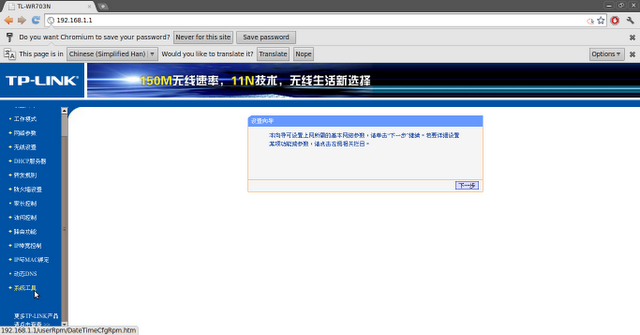
- On the left navigation bar – select “系统工具” (System Tools)
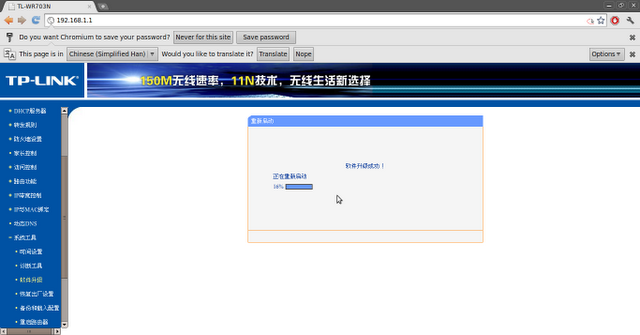
- Then select “软件升级” (Software Upgrade)
- In the main frame – select “浏览…” (Browse…)
- Browse and select the “openwrt-ar71xx-generic-tl-wr703n-v1-squashfs-factory.bin” file from one of the pre-built image packages.
- Then click “升 级”. (Upgrade)
- Press “OK” on the confirmation.
- Wait for the software to load (patiently).
- The router should reboot into OpenWRT, press login without a password entered.
- Go to password configuration and set up a password if required.




OpenWRT Upgrade
Upgrading from OpenWRT should be simple
- Power on the router via USB cable
- Connect wired Ethernet connection to PC
- Access http://192.168.1.1/ using your browser
- Login to access the web interface (Luci)
- Select the “System” tab at the top
- Then select “Backup / Flash Firmware”
- Check or Uncheck “Keep Settings” as you desire
- Click “Choose File” and select the “openwrt-ar71xx-generic-tl-wr703n-v1-squashfs-sysupgrade.bin” file from one of the pre-built image packages.
- Follow the prompts…missing the last step here…

Add-ons and Accessories
- http://www.thingiverse.com/thing:25257 – Generic 3D printed replacement case for the router.
- http://ww.kean.com.au/oshw/WR703N/ -Kean’s IO expander board for the router. Featuring USB Hub & FTDI dual serial/GPIO/JTAG.
- http://www.thingiverse.com/thing:25389 – 3D printed case for the router + Kean’s Expander board.
Project Ideas, Examples & Guides
To be updated
- Wireless Webcam
- Helicopter controller replacement
- Wireless/Internet connectivity for your projects
- Light Painting for Long Exposure Photography
- WiFi Remote Control Toy

maybe a good idee to use tar extention instead of 7zip since taz it is include in busybox (even in failsafe mode).Keep the good work !
hi,
i just tried the stardartimage for the 703n, i liked the webcamstreaming but then i wanted to try the usb overlay for more space and it didn´t work for me with my ext4 usb stick.
i even reflashed and cleaned all the presets since you mentioned it supposed to be the first step for one of ur older images, would be nice if you could check on that if you find time.
and about the availible packets, we can´t have all packets like when i tried to install nano it showed that it wasn´t availible on ur server.
thx yaku
http://imgur.com/NzbWL0E
I did everything up to step 10, but it didn’t reboot into OpenWRT. I waited pretty long after it showed that the flashing is 100% complete. Tried reaching 192.168.1.1 after that – no luck. Then unplugged power from the router and plugged back in again. Now my laptop simply doesn’t see it. When power is connected to the router it blinks at first, and after that the blue diode is constantly on. Do you think it’s bricked? Anything I could try before throwing it to trash? 🙁
The blink then steady is typical of a normal boot – i.e. it probably is working properly. Are you connecting via wired Ethernet? Have you configured your own Ethernet to be able to talk to the default address?
Hi,
First of all thank you for your great work! I printed the case for the router and the expansion board but am wondering if the jumpers and the headers for the jumpers on the expansion board need to be completely removed in order to make the board fit in the case? Maybe something went wrong with my print but it does not fit if I leave them on?
Kind regards,
Sander
Everything should ‘fit’, can you send me a photo of where you think it doesn’t fit on your print? If your two boards fit inside the two slots, then your print settings should be OK – it might be that you’re using longer than expected headers.
Hi! It´s this firmware compatible for all wr703n versions?
I have the version ver:1.6
Thanks a lot!
Check the descriptions next to the images.
I got this to use it as a wireless bridge, assuming dd-wrt would take care of the Chinese-only firmware. I went through the instructions above and now I’m looking at the Luci interface, thank you!
However, I can’t find any option to configure it as a bridge. The modes available are: AP, Client, Ad-Hoc, 802.11s, Pseudo Ad-Hoc, AP (WDS), Client (WDS).
Any suggestion? Is the wireless bridge function not supported by the above dd-wrt built?
Hi, I actually need to configure the router for the same purpose right now, I’ll post the instructions once I get it working.
Hi, so I’ve just configured my router to act as a repeater of sorts. I’ve deliberately kept the new network on ‘lan’ while the host network is on ‘wan’, tweak as you see fit :
Log into Luci
Select Network -> Interfaces
Change to a new static IPv4 address that does not conflict with your host WiFi network
Select Network -> Wifi
Press Scan
Press Join Network for your host WiFi
Enter your security details (e.g. WPA-PSK keys)
Check that ‘wan’ is selected’
Press Submit
Press Save & Apply
Select Network -> Wifi
Press Add
Under Interface Configuration
Change the ESSID under the General Setup Tag
Select Network as LAN
Select Wireless Security Tab to change security/key settings
Press Save & Apply
Hi,
First a quick correction, I was talking about openwrt in my first comment and mistakenly called “dd-wrt” (probably because at that time I was looking up how to go from openwrt to dd-wrt).
Back to my question, I checked the openwrt wiki for wireless bridge and it didn’t sound exactly straightforward. Before even trying anything I tried using the unit as Client and that didn’t work at all – the WiFi was always disabled. It did work fine as AP so the hardware should have been ok.
At that point I went ahead and switched to dd-wrt after all, by simply loading the dd-wrt factory.bin file from the openwrt GUI. After that, I was able to configure it as wireless bridge similar to your post above, by configuring as client and making a VAP with a different SSID.
The only problem with dd-wrt was the LED was off all the time; I tried some commands and it flickers so I was thinking about having a script running to flash the LED every few seconds. But before trying that I wanted to take a look at the other way to get English firmware with the one from TL-MR3020. In order to do that, I wanted to revert to original firmware by using the dd-wrt “revert.bin” file. Well, I must’ve pushed my luck because I ended up bricking the unit (LED cycle seems ok but no IP, telnet or SSH). I gave it a shot at the serial port un-bricking but only got garbage characters on the screen.
Waiting for a new unit to arrive; I might take another shot at reviving the 1st one at a later time.
Thank you and Best Regards
Update: Got the new unit yesterday and started by trying to load the FW for TL-MR3020 (following the same instructions from this page). Received “Error code: 18005. Upgrade unsuccessfully because the version of the upgraded file was incorrect. Please check the file name.” (in Chinese of course). Looked up online and found an edited MR3020 FW to match WR703N hardware ID; uploaded OK.
With the English GUI (and the MR3020 manual which doesn’t really match the GUI options) I tried to set it up as client and/or bridge. First I found I have to enable the “Software Switch” since the real MR3020 has an actual switch to change modes. After that I selected WISP mode and it looked like what I needed. However, I was unable to connect using WPA2. The GUI shows key fields for WEP only and I assumed selecting WPA2 will simply work with the same key but the options change automatically to “Open”. A site survey from another PC shows the AP is operating in WPA mode (not WPA2 I wanted). Updated to the latest FW version from TP-Link but made no difference. Also, the LED is off all the time after flashing during power on.
So, I decided to go back to your instructions above. When trying to load openwrt I got the 18005 again. It made sense since now my router “thinks” it is MR3020. Thus I downloaded the Chinese WR703R firmware, got the Firmware HW ID Modifier (as posted on openwrt forums) and edited the FW to match MR3020 HW ID. After that I loaded the Chinese firmware and then loaded the Base openwrt as instructed on your page.
Subsequently, I followed your steps above to configure a wireless-repeater-bridge (or such).
I have just a couple of minor comments. When selecting “a new static IPv4 address that does not conflict with your host WiFi network” at first I simply assumed it means no IP conflict so I used 192.168.1.2 (not used on my test network). The result was the client was connecting at 1Mbps and not seeing anything on the network. As soon as I thought about different subnet and changed to 192.168.0.1 the client is connecting at 150Mbps and communicates OK.
At the second step, it automatically creates the WWAN network; I mentioned before that I couldn’t get the client mode working – I think it had to do with manually setting up WiFi as client and that makes no additional WWAN. In conclusion, even when connecting to a “hidden” wifi just scan, select the BSSID, then manually enter the SSID.
I think for what I need this should work (using it now) and there’s also room for some tweaking if need be.
I still have a question, what would be the best way to installing some packages not available on your repository, for example nzbget (and nzbget gui)?
Regards
Hi Nick – I don’t understand why you’re force-ably loading TL-MR3020 firmware onto a TL-703N?
Sorry I didn’t clarify on the different subnet, but yes you need a different subnet. You could just install the normal OpenWRT images and install the packages from there – I only provide my images as an easy starting point with most of the hacking stuff built-in.
Loading TL-MR3020 FW is listed on a few websites as another way to get English GUI on the WR703N. Supposedly, they are basically the same router and the FW should work.
Thanks for the answer on additional packages too.
> Madox says:
> April 4, 2014 at 15:22
> Hi Nick – I don’t understand why you’re force-ably loading TL-MR3020 firmware onto a TL-703N?
Managed to revive the 1st device! The problem was the serial to usb adapter I was using, got a “USB to TTL Serial Cable PL-2303HX Chipset” and used 3 of the 4 pins. On a openSUSE 13.1 x64 it shows as /dev/ttyUSB0 and I used CuteCom to talk to it. Following the openwrt wiki unbrick instructions was straightforward.
Based on previous discussion about additional packages I tried installing the trunk firmware directly; it went fine but ran into a few problems later on. Of course, the trunk image doesn’t come with GUI but that shouldn’t be a problem, just login via telnet and install it.
Via telnet I changed the IP setting to 192.168.1.2 and connect it to the main switch then tried opkg update. However, opkg complains about bad url. Tried pinging 8.8.8.8 and got network unreachable, although I could see other clients on the network, just not the internet. Looked into routing and added a default route to 192.168.1.1 which allowed me to ping 8.8.8.8 but opkg still complains and I couldn’t see google.com which points to DNS settings.
At this moment I decided it might be pointless to fight one bad setting after another and not knowing how many other issues I’ll find, therefore I decided to go with the stable release. So, now it runs OpenWrt Attitude Adjustment 12.09 / LuCI 0.11.1 Release (0.11.1) kernel 3.3.8.
Thank you very much for the time and support, Keep up the good work
That works, pretty neat. Now I have a full time use for a device that was just sitting in a drawer. Thanks
Steve
Hello,
Firstly thank you for your builds, I have been using then since you first made them available.
I’d quite like to use one of my spares as a WIFI with VPN.
That is have the lan connect to a VPN service (PIA) via L2TP, and let wifi clients use that.
Do you know if your 23-02-2013 image can do that, and what the steps might be from reset?
Regards
Hi Matt 🙂
Erm that sounds suspiciously like what I was intending to do before I got an Android stick with the PIA client on it. I am tempted to get the Amazon Fire so my need for a WiFi PIA VPN will drive me to document how to set it up… Coming soon.
It looks like I neglected to include OpenVPN in anything later than the 2012 images… DOH!
Yep, my needs are simple.
Connect TP to my Telstra cable (LAN)
Connect VPN
Connect TV to WIFI
Run Netflix app on TV.
Bonus points, a http page to toggle VPN.
I would think a specific TL-WR703N-VPN build would exist, but my google-fu has failed me.
Wondering if anyone knows of a tiny Linux distro that would run on this, using the Ethernet/Wireless to pick up an IP via DHCP and act as a simple client.
I don’t need it as a router, only need it as a logging device running a script.
Thanks!
OpenWRT?
Hi Madox.
Do you know how to copy a script file from laptop onto the wr703n router.
Steps would help please.
I have installed putty on ubuntu to perform this.
Your help would be greatly received.
Cheers
Dear Madox,
I have issues while trying to connect my WR703N running your last USBIP image and my Dockstar running Linux Debian (3.2.0-4-kirkwood #1 Debian 3.2.54-2 armv5tel GNU/Linux). It seems the protocol level is not the same, but I really have no skills nor time yet to do a cross-compiling virtual machine 🙂 Would it be possible to have the same protocol version of the USBIP software on your USBIP image (1.1.1-2_ar71xx ?) as the package found in the Wheezy (stable) Debian release (installed on my system : 1.1.1+3.2.17-1) ?
Many thanks in advance,
Best regards 🙂
Jean
What version of Open WRT would support a client bridge? I have installed a version of “Attitude Adjustment” plus relayd and Luci proto relay. I have had no luck so far with correctly configuring open wrt as a client. It’s easy to set it up the wifi, but getting the client bridge to work is complex. There are many tutorials, but inevitably one or two of the screens in the Luci interface will be different than the examples given, and have either more setting or less, leaving me stumped as to how to follow the example. Very complex to configure, and at times the 703N locks up and I end up resetting it.
My goal is to get the 703N to provide as a wireless source of bridging to my LAN. I’m wondering if I should have just left the Chinese software on it, as it is now difficult to get it back.
Tim, I’m afraid the problem might not really be with the complexity of the instructions or those being incomplete, it might have something to do with not reading them. For example, a few posts above yours there are clear, step-by-step instructions for exactly what you want:
http://www.madox.net/blog/projects/tp-link-tl-wr703n/comment-page-3/#comment-247365
Muchas gracias.
Gracias por compartir conocimientos
I was wondering if anyone knew of a Linux distro which can be installed on this that doesn’t have a purpose, is embedded Linux only.
In other words, I am currently using the device for some logging but have not been able to find a basic, command line only version of Linux for this. I only need basic Linux CLI tools, need a DHCP client so the device will pick up it’s IP and a little space to keep some logging.
Because of all the OpenWRT tools, features, functions etc, there is only 800K left of space.
Would love to know if there is such a Linux version out there.
The answer is still OpenWRT… It can be configured and built without whatever functionality you don’t need. E.g LuCi the Web interface takes around a MB of space. So go ahead and build a minimal OpenWRT image and you will end up with about 2MB free space. Why do you need the free space for?
Hi
I’ve got OpenWRT on my WR703N, and the Kean expander board hooked up to it. The firmware is (get ready for a copy/paste) OpenWrt Attitude Adjustment 12.09-beta / LuCI Trunk (trunk+svn9220).
I’m trying to figure out how the GPIO on the board can be used. I’ve poked around the /sys and /proc folders to look for likely endpoint I can echo to, but haven’t had any luck. Any ideas?
Steve
If you care to install one of my images (e.g. The standard one…) I can provide you with sample python code.
Can you also provide me with said code?
Hi,
Any chance of adding ‘nano’ to your depository of available packages?
Regards,
John
Will flashing the standard firmware image to my TL-WR703N let me setup a nas with a usb hdd like in this video?
https://www.youtube.com/watch?v=ZeT6duZifY0
Thanks.
Hey Madox, I got the 1.7 latest version of the WR703N (chinese). I’ve seen a lot of warnings and it says that only v1.7 build 121204 partially works, but 3.17.1 Build 140120 Rel.56593N doesn’t (which is the one I got). Does your latest version supports this one as well? I’m really concerned about any potential brick. I don’t like the idea of losing my eth port either.
hi
i’m interested in that sample code as well
gon
Dear Madox,
The new “Barrier Braker” release candidate 1 of OpenWRT is now available (http://downloads.openwrt.org/barrier_breaker/14.07-rc1/ar71xx/generic/openwrt-ar71xx-generic-tl-wr703n-v1-squashfs-factory.bin). Did you schedule an upgrade of the “USB/IP” release of you TPLink 703n image ?
I did lot of tests using your last release, but have never been able to make devices to connect together because of an error of the protocol version (this has been described above).
I hope that this time this will work : I’ll leave a new message later with all my tests results.
Cheers,
Jean
i’m sorry for the (maybe) stupid question…
i live in a country area and connect to public wifi through a long range antenna+wifi usb-card (yes, an alfa).
I’d like to know if it’s possible to connect the incoming signal (the usb wifi card) to the router and then use the router as repeater through the LAN and/or router’s own wifi
thx!!
hola amigo !.
i purchased the tl 703n to make the Personal Onion Router To Assure Liberty PORTAL, ie. run thru TOr. it seems that the version (v 1.7 ) that i recieved is the same as “Paul’s” in the above comments/request. I am desperate to find which OpenWRT build will work to flash the unit. I am very new to this and need gentle guidance. I would appreciate any help.
regards,
doug
Hi,
Thanks for all your great work… having fun with this little guy but….
Trying to get minicom installed.
Have
openwrt_tl-wr703n_standard_2013-02-23_squash-factory.bin
up and running but am having no success getting minicom installed.
Is there a better bin to use?
opkg update
opkg list
doesn’t show it being in the package.
Got the minicom files on the device but ./configure doesn’t want to work… guessing it has some thing to do with not using bash but ash from busybox.
thanks for any insight.
Hi,
I changed the ip from static to dynamic and now the router doesn’t work… tried the reset button but i’m unable to get it to work as before. Anyone with a solution to my problem please help
Look here : http://wiki.openwrt.org/toh/tp-link/tl-wr703n
I am finally ready to try to set up USBIP, to be used for sharing a printer. Is your version here still recommended? I don’t want to spend a lot of time only to discover that it won’t work well. I am worried that it states it has not tested much but should I assume that it works well enough or not for a print server function? Also how do I tell what version of the wr703 I have. I am not sure if there is more than one version. I own six of these and have been using these with dd-wrt in the past but need a stand alone implementation of a print server. I could go with dd-wrt and a flash card to us its USB print server facility by offloading to the flash card, but I would like the MFC scanner to work as well which isn’t supported with dd-wrt, so I plan to dedicate a whole device to this one function, hopefully by using your USBIP build. Another thing of concern is that the USBIP software for Windows has not been updated in a while.
Thanks!
Hi there.
I did research the web before buying the TL-WR703N router. Flashed “Standard” image into it and have it working. I bought it to use it as 3G router but the only thing I can’t get to work with it is the 3G stick. It’s a Huawei E160E and the version on router is 1.6.
It’s funny because many sites of openwrt and TL-WR703N they all are about using it as 3G modem…
The TL-WR703N has only 4Meg of flash to work with (unlike 8M and up of some of the more robust routers). Using the 703n with expanded firmware like OpenWRT or dd-wrt will allow the unit to still do magic well beyond it’s original design (as you have witnessed here) but there is a problem with this device in wanting too much versatility with its small flash size, which prohibits a distributor of a package of OpenWRT routines from loading onto the build more than a few of them. Thus why in the arena of 703n and others with the 4M size, you’ll see authors such as Mr. Madox offering only a few functions on their unique build of OpenWRT, which nets out to be everything necessary to make their main theme work with any nice to have’s crowded in if possible. With a 4M flash size you have to choose a subset of all the tools or “packages” you want to install on it.
However, since you stated you were primarily interested in cell-modem support, let me make this suggestion. For the best possible 3G/4G USB Modem stick support the best thing going right now is ROOter over at http://ofmodemsandmen.com/downloadsp.html . It is a highly dynamic project (builds being updated 3 times a week or more some weeks), so chances are if something is not working, it will be soon. They support a suite of modems (23 and growing) that the native firmware on the 703n can never support. Their builds are based on the new Chaos Calmer OpenWRT version and contain the basic Luci shell with the USB modem support and normal OpenWRT switching interface capability, plus automated switching through variants of the Load Balancing package. From a hardware perspective, wired LAN as well as providing the wi-fi radio to serve as either a normal Access Point or in one of many other combinations, prioritizing selecting from (or routing via) multiple Internet source(s) using the Load Balancing package, which controls the Internet resources based on either routing criteria or simple fall-over specification of the sources.
If your goal is wanting more storage in the same size package, you might select the GLi.net GL-AR150 which requires a different build of firmware from the 703n of course, but with that device, which is based on the exact same chip, you’ll have 8M of flash instead of the 4M. Also note the GL-AR150 has an external antenna jack and requires an antenna that may or may not be purchased with the unit.)
Otherwise if 4M of flash is not a concern and your goal is only to look for something small router-wise to give your USB modem a MiFi capability, you might go with the even smaller and cheaper router that came out early 2015 – it’s known for its circuit board number, A5-V11, and is commonly sold online as a “Mini USB Portable 3G/4G router – rt5350f ” or “Portable Wireless Mini USB WiFi Router 3G/4G Hotspot 150Mbps Wlan 802b/g/n TR”. It, of course, has it’s own unique build of firmware. Loading the ROOter build for this device will enable many modems lying around the house to be SIMed-up and plugged into this bic-ligher sized package of a router to create an inexpensive MiFi device. The A5-V11 board routers are going for around $8 US, including international shipping, as of today.
Hi Maddox,
Great work here!
I am wondering if you could you could provide some guidance as to how to successfully add the USB IP to the latest standard openwrt distro for this platform?
this would be very helpful. i like to stay up to date and will be using this for wireless PLC programming.
Hi ,
I have a bricked wr703n, can I reprogram the firmware via a flash programmer?
Do I need to reprogram it with uboot first, if so how?
regards
kerravon
Yes you can.. just google how 🙂
Does anyone could help me to repeat the GoPro hero4 camera WiFi range by using TP-Link WR703N (through frimware installed) ?
HI,
I have Dlink DWR-116. Any about to hack it?
Hi, could you please re upload standard firmware?
Regards,
Ezequiel
Hi, the links are broken but they’re still available here :-
https://code.google.com/archive/p/madox/downloads
Thanks so much for your quick reply!
I installed standard version and it’s works perfectly.
Then, I extend the storage with 2gb micro SD (w/ USB adapter) without problems.
After used different versions of OpenWRT on my gadget, I can affirm that your firmware it’s the best.
Thanks again.
Ezequiel
Hello! Great site with lots of info, i have spent hours searching google and cant find anything. Long story short i goofed my TL-WR703N pretty bad by erasing the flash from the u-boot menu. I’ve figured out the GPIO parts and soldered 4 wires to the JTAG GPIO pads. How would i go about using a raspberry pi to flash a new U-Boot? The blue light stays a very dim blue with no flash when i power on the unit.
Frankly for the price of the unit, I would just trash it or replace the flash chip directly… (you may not have a stash of 4Mb/16Mb chips like I do…)
If i replaced the chip, i would have to flash it anyway since i have no way to copy the contents of that to the new chip correct? I like tinkering with stuff so i would rather try to save it as opposed to buying a new one. I’m sure the hardest part is soldering the 4 wires and i already have that done. Any advice?
Sorry no advice in JTAG, I probably the chip external using a $3 USB flash programmer.
I do have a Chinese top853 programmer, maybe i can use that to program it. Thank you.
Hi! I don’t know if you read these comments anymore, but could you send me your USBIP-ready firmware? Yep, it’s quite old but it seems WR703N is not supported anymore and I cannot find so small images that could run USBIP server. Thanks!